
Watch How Your Students Write in Real-Time

See exactly how your students write and revise with our free Google Docs revision history playback feature. Track writing progress, identify areas for improvement, and provide targeted feedback. Enhance your grading workflow with VibeGrade's AI tools that work seamlessly with Playback Writing

5 min read
In-depth guide
For Teachers worldwide
No credit card required
John Doe
Robert Johnson
Jane Smith
Emily Davis
Tyler Durden
Dora
loved by teachers around the world

What is Google Docs Revision History Playback?

Google Docs revision history playback is a powerful feature that allows teachers to replay the entire writing process of their students' documents. Instead of just seeing the final product, you can watch how students developed their ideas, made revisions, and structured their arguments over time.

With VibeGrade's enhanced revision history tools, this process becomes even more valuable for understanding student writing behaviors and providing targeted feedback.

Why Revision History Matters for Teachers

Understanding how students write—not just what they write—provides invaluable insights into their learning process. Here's why thousands of teachers are using revision history playback:

1. Identify Writing Patterns

Watch how students approach their assignments:

  • Do they start with an outline or dive straight in?
  • How often do they revise their work?
  • Are they making substantive changes or just fixing typos?

2. Detect Academic Integrity Issues

Revision history helps you:

  • Spot sudden large text insertions that might indicate copying
  • See if work was completed over time or all at once
  • Verify that students did their own work

3. Provide Process-Based Feedback

Instead of only commenting on the final draft, you can:

  • Praise good revision habits
  • Point out where more planning would help
  • Encourage students who show improvement through drafts

How to Use Google Docs Revision History

Here's a step-by-step guide to accessing revision history in Google Docs:

  1. Open the student's document in Google Docs
  2. Click "File" → "Version history" → "See version history"
  3. Use the timeline on the right to navigate through changes
  4. Click on any version to see what the document looked like at that time

Pro Tips for Teachers

  • Use "Show changes" mode to highlight what was added or removed between versions
  • Name important versions by clicking the three dots next to a version
  • Look for revision patterns across multiple student documents

Introducing VibeGrade's Enhanced Revision History Features

While Google Docs provides basic revision history, VibeGrade takes it to the next level with AI-powered analysis and insights.

AI-Powered Writing Analysis

VibeGrade automatically analyzes revision patterns to help you understand:

  • Writing velocity and pause patterns
  • Revision depth and frequency
  • Time spent on different sections
  • Overall writing process efficiency

Automated Feedback Suggestions

Based on the revision history, VibeGrade suggests personalized feedback for each student:

  • Commend strong revision practices
  • Identify areas where students struggled
  • Provide specific suggestions for improvement

Bulk Analysis for Multiple Documents

Save hours by analyzing revision histories across your entire class:

  • Identify common writing challenges
  • Compare revision patterns between students
  • Generate class-wide insights for instruction

Real Teacher Success Stories

"Revision history playback changed how I teach writing. I can now see where students get stuck and provide help exactly where they need it." — Sarah M., High School English Teacher

"VibeGrade's analysis of revision history helps me give feedback that actually improves my students' writing process, not just their final drafts." — Michael R., Middle School Teacher

"I caught several cases of plagiarism I would have missed without revision history. It's become an essential part of my grading workflow." — Jennifer L., College Professor

Common Use Cases for Revision History Playback

1. Process-Based Grading

Many teachers now include the writing process as part of their grading rubric. Revision history lets you:

  • Award points for draft development
  • Recognize students who revise thoroughly
  • Encourage better writing habits

2. Writing Conferences

Use revision history during one-on-one conferences to:

  • Show students their own writing patterns
  • Discuss specific moments in their process
  • Set goals for future assignments

3. Parent Communication

Share revision history insights with parents to:

  • Demonstrate student effort over time
  • Show areas of improvement
  • Provide evidence-based feedback

Best Practices for Using Revision History in Your Classroom

Set Clear Expectations

Let students know you'll be reviewing their revision history:

  • Explain how it helps you help them
  • Emphasize that the process matters as much as the product
  • Encourage regular saving and revision

Create Revision Checkpoints

Build revision into your assignments:

  • Require students to submit drafts at specific times
  • Use VibeGrade to track completion of revisions
  • Provide feedback at multiple stages

Teach Revision Strategies

Use revision history as a teaching tool:

  • Show examples of effective revision
  • Highlight before/after improvements
  • Model your own revision process

Technical Requirements and Setup

To use Google Docs revision history playback, you need:

  • A Google account with access to student documents
  • Students must share their documents with editing permissions
  • Chrome browser for best performance with VibeGrade

Getting Started with VibeGrade

  1. Install the VibeGrade Chrome extension (free)
  2. Open any Google Doc shared by your students
  3. Click the VibeGrade icon to see enhanced revision analysis
  4. Get AI-powered insights instantly

Privacy and Security Considerations

VibeGrade takes student privacy seriously:

  • All analysis happens locally in your browser
  • No student data is stored on our servers
  • Compliant with FERPA and COPPA regulations
  • You maintain full control over document access

Frequently Asked Questions

Can students delete their revision history?

No, students cannot delete revision history in Google Docs. Once changes are made, they're permanently recorded.

How far back does revision history go?

Google Docs keeps revision history indefinitely for documents that haven't been deleted.

Can I see who made which changes?

Yes, if multiple people edit a document, revision history shows who made each change with their name and profile picture.

Does VibeGrade work with other platforms?

Currently, VibeGrade's revision history features work with Google Docs. Support for other platforms is coming soon.

Transform Your Grading with Revision History

Revision history playback is more than just a feature—it's a window into your students' learning process. Combined with VibeGrade's AI-powered analysis, you can:

  • Save hours on grading while providing better feedback
  • Understand each student's unique writing process
  • Identify and address writing challenges early
  • Build stronger writers through process-focused teaching

Ready to Get Started?

Join thousands of teachers who are already using VibeGrade to enhance their grading workflow. Our Chrome extension is free to install and works seamlessly with Google Docs.

Install VibeGrade today and see the difference revision history analysis can make in your classroom.


VibeGrade is the AI-powered grading assistant trusted by thousands of teachers worldwide. Our tools save teachers 90% of their grading time while providing better, more personalized feedback to every student.
See VibeGrade in Action

Grade Anything

Smart Annotations

Save time grading while providing even richer feedback using Smart Annotations. VibeGrade analyzes the text with precision using the teacher's rubric to pinpoint successes and areas for improvement.

Grade Breakdown

Save time calculating a student's final grade and back it up with a detailed breakdown of your rubric. Instantly get a Grade Estimate with high accuracy using your criteria. Take back control of your time and grading with VibeGrade.

Uphold Academic Honesty

Playback Writing

Always Free
Rewind and replay the student's writing process to see how they crafted their essay. Identify revisions, struggles, and potential AI assistance to provide more insightful feedback.

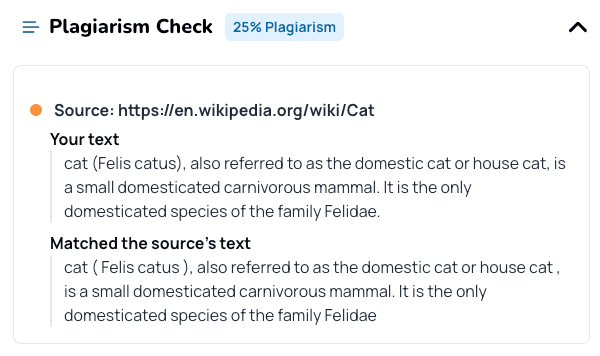
Plagiarism Check

Promote academic integrity by leveraging our built-in Plagiarism Check and Citation technology. With VibeGrade, you have all the necessary tools integrated into your grading co-pilot for seamless plagiarism check.

Plagiarism Detector illustration

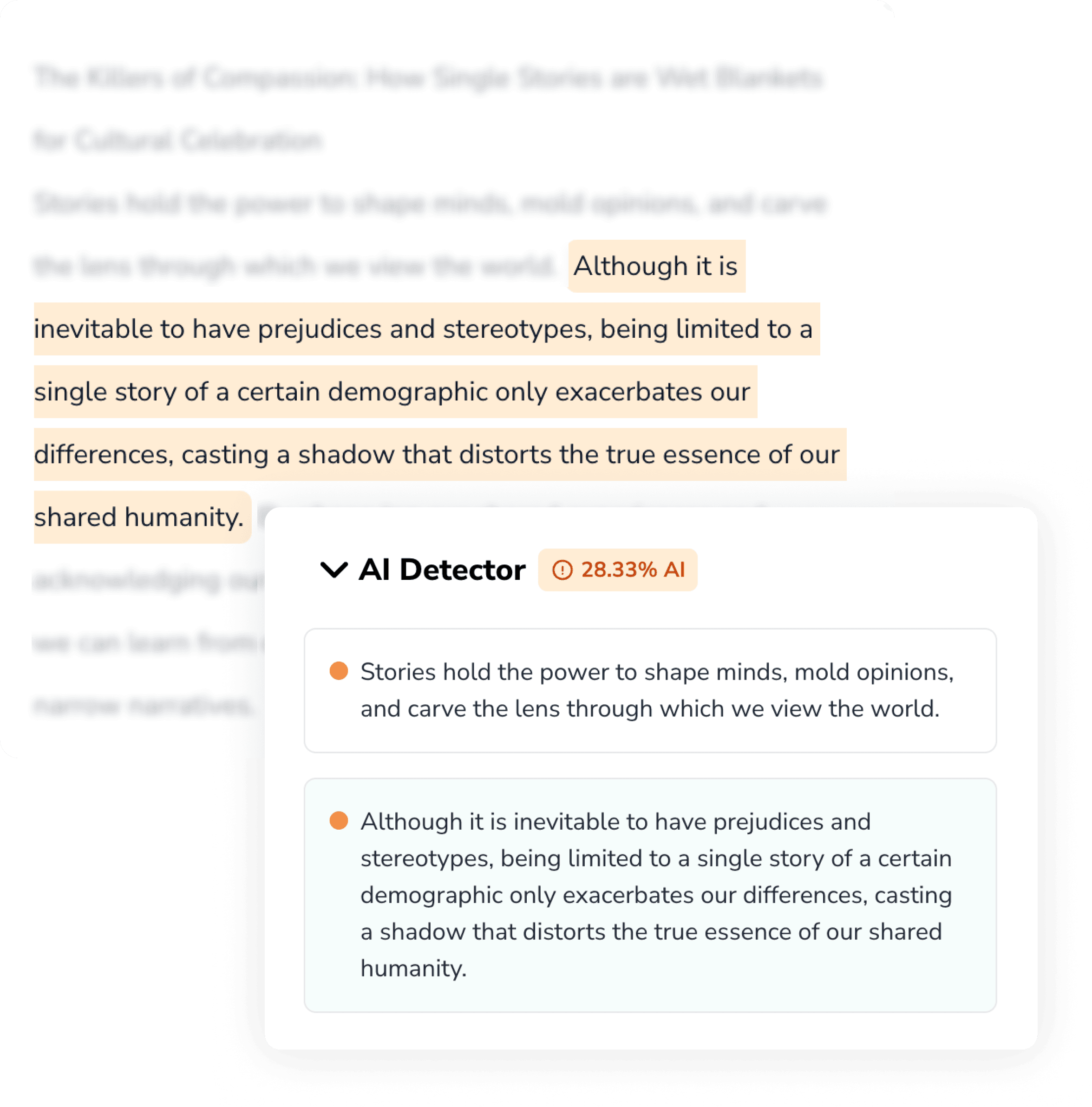
AI Writing Detection

Powered by Pangram

Safeguard academic integrity with our built-in AI Writing Detection technology, powered by Pangram. Pangram is state-of-the-art technology to identify AI-generated text. Able to detect the newest AI models, and unbiased against nonnative speakers.
Now available directly in VibeGrade.

AI Detector illustration

Create Anything

Create Any Resource

Create a lesson plan, a quiz, or a worksheet in seconds.

Frequently Asked Questions

What is VibeGrade?
VibeGrade is the AI essay grader that works directly in Google Docs, Canvas, and other LMS platforms with your own customized rubric criteria to deliver personalized feedback and a final grade breakdown while checking for plagiarism and AI writing on essays.
How is it different from ChatGPT?
VibeGrade is an AI essay grader specially designed to help educators grade essays with responsible and secure use of AI, whereas ChatGPT is a general purpose chatbot.

Although ChatGPT can provide general feedback on essays, it makes it hard to pinpoint specific areas for improvement. ChatGPT's performance is inconsistent and often requires tweaking prompts, leading to varied results. VibeGrade offers consistent outcomes instantly without any complicated setup and annotations so teachers can instantly see successes and issues, saving hours of time.

Unlike ChatGPT, which lacks built-in plagiarism and AI writing detection, VibeGrade includes these features to ensure academic integrity so teachers don't have to pay for other expensive tools.
How does it know the criteria?
VibeGrade adapts to your unique rubric, analyzing student work solely based on the criteria you provide, ensuring accurate, personalized grading. Simply provide the level 4 section of your rubric, and VibeGrade will take care of the rest!
How accurate is the grade estimate?
Our grade estimates are designed for precision, typically within ±3% of the final grade.
Doesn't AI introduce more bias?
We take pride in VibeGrade being the most fair and objective grading tool available. We believe that the professional judgement of teachers is key to fair grading, which is why our tools only use the criteria and grade level provided by the teacher to evaluate work.

We acknowledge the biases that generative AI technology may introduce, which is why we rigourously test our systems, and always remind our users that teachers are in the driver's seat.
Will VibeGrade replace teachers?
Absolutely not. VibeGrade enhances your ability to provide fair and efficient grading, reinforcing the essential role of teachers in education.
How can I shorten the feedback?
After VibeGrade generates feedback, click on it to open an edit box. You can type or say 'make the feedback shorter' and the system will adjust it automatically. This preference will be remembered for future grading.
How can I create or upload a rubric?
You have three options: 1) Upload your existing rubric at VibeGrade.com/teacher/rubrics, 2) Generate one using our form, or 3) Browse the Rubric Library for rubrics shared by other teachers.
What LMS does VibeGrade work with?
With the VibeGrade extension, we support Google Docs, Canvas, Toddle, and Google Classroom. For other platforms, you can paste essays directly at VibeGrade.com or drag and drop files to grade.
Can I buy for my school or district?
Yes! We offer special pricing and packages for schools and districts. Contact our team to discuss volume pricing, implementation support, and custom solutions tailored to your institution's needs.
Can I cancel at any time?
Yes! You can cancel your subscription at any time. Your access will continue until the end of your current billing period.

Watch How VibeGrade Transforms Grading

See how teachers save 90% of their grading time while providing better feedback to every student.

We love teachers and teachers love us

“VibeGrade has significantly reduced my workload. I can now provide more detailed feedback to my students without spending hours grading.”

Karen Whitfield

High School English Teacher

“I love how VibeGrade works directly with Google Docs. I can give every one of my students high quality feedback just like I would but a lot faster.”

Tanya Morales

High School English Teacher

“The consistency in grading has helped my students understand their areas for improvement. It's been a game-changer for their writing skills.”

Derrick Patel

Middle School Language Arts Teacher

“I was skeptical at first, but VibeGrade has proven to be an invaluable tool. My students are better prepared for standardized tests now.”

Alana Brooks

AP Literature Teacher

“VibeGrade has been a game-changer for my grading process. It's fast, accurate, and saves me so much time. I can now focus on providing more personalized feedback to my students.”

Brian Nguyen

High School History Teacher

“It helped me grade 65 essays over the weekend, so well-worth the small price for the time saved that I spent with my family.”

Metina B.

Middle School English Teacher

“VibeGrade has significantly reduced my workload. I can now provide more detailed feedback to my students without spending hours grading.”

Karen Whitfield

High School English Teacher

“I love how VibeGrade works directly with Google Docs. I can give every one of my students high quality feedback just like I would but a lot faster.”

Tanya Morales

High School English Teacher

“The consistency in grading has helped my students understand their areas for improvement. It's been a game-changer for their writing skills.”

Derrick Patel

Middle School Language Arts Teacher

“I was skeptical at first, but VibeGrade has proven to be an invaluable tool. My students are better prepared for standardized tests now.”

Alana Brooks

AP Literature Teacher

“VibeGrade has been a game-changer for my grading process. It's fast, accurate, and saves me so much time. I can now focus on providing more personalized feedback to my students.”

Brian Nguyen

High School History Teacher

“It helped me grade 65 essays over the weekend, so well-worth the small price for the time saved that I spent with my family.”

Metina B.

Middle School English Teacher

“VibeGrade has significantly reduced my workload. I can now provide more detailed feedback to my students without spending hours grading.”

Karen Whitfield

High School English Teacher

“I love how VibeGrade works directly with Google Docs. I can give every one of my students high quality feedback just like I would but a lot faster.”

Tanya Morales

High School English Teacher

“The consistency in grading has helped my students understand their areas for improvement. It's been a game-changer for their writing skills.”

Derrick Patel

Middle School Language Arts Teacher

“I was skeptical at first, but VibeGrade has proven to be an invaluable tool. My students are better prepared for standardized tests now.”

Alana Brooks

AP Literature Teacher

“VibeGrade has been a game-changer for my grading process. It's fast, accurate, and saves me so much time. I can now focus on providing more personalized feedback to my students.”

Brian Nguyen

High School History Teacher

“It helped me grade 65 essays over the weekend, so well-worth the small price for the time saved that I spent with my family.”

Metina B.

Middle School English Teacher

“VibeGrade has significantly reduced my workload. I can now provide more detailed feedback to my students without spending hours grading.”

Karen Whitfield

High School English Teacher

“I love how VibeGrade works directly with Google Docs. I can give every one of my students high quality feedback just like I would but a lot faster.”

Tanya Morales

High School English Teacher

“The consistency in grading has helped my students understand their areas for improvement. It's been a game-changer for their writing skills.”

Derrick Patel

Middle School Language Arts Teacher

“I was skeptical at first, but VibeGrade has proven to be an invaluable tool. My students are better prepared for standardized tests now.”

Alana Brooks

AP Literature Teacher

“VibeGrade has been a game-changer for my grading process. It's fast, accurate, and saves me so much time. I can now focus on providing more personalized feedback to my students.”

Brian Nguyen

High School History Teacher

“It helped me grade 65 essays over the weekend, so well-worth the small price for the time saved that I spent with my family.”

Metina B.

Middle School English Teacher

Get Started on Mobile

Create your account now and we'll send you the Chrome extension link when you're back at your computer.

Trusted by thousands of teachers worldwide